
YT Saver saves YouTube thumbnails in full size
YT Saver is a free online tool. Paste a YouTube link to save the video's thumbnail in every size, build a link that starts at the right moment or copy clean embed code. YT Saver runs in your browser, with no sign-up.
- FreeNo account, no limits
- In your browserNothing to install
- Five sizesUp to 1280 × 720, JPG or WebP
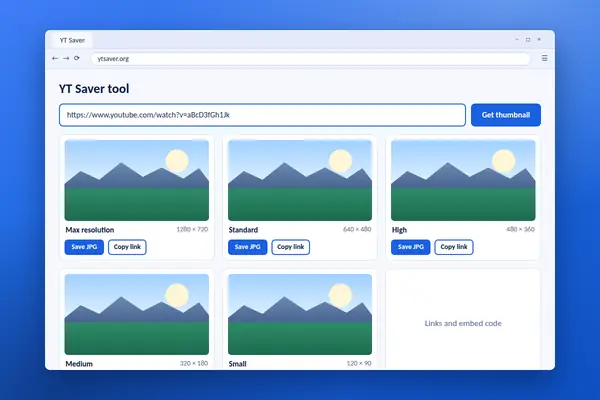
YT Saver tool
Paste a YouTube link. YT Saver finds the video and gives you its thumbnail in every size, plus share links and embed code.
YT Saver works in your browser. The link you paste is not sent to this site, and the images load straight from YouTube's public image server. YT Saver does not download videos. Thumbnails belong to the people who made them, so save them for your own videos or with permission.
What YT Saver is
A small online tool for the parts of a video that YouTube shares openly: its picture and its link.
YT Saver is a free tool that works with YouTube links. Paste one in and it shows the video's thumbnail in every size that YouTube stores, ready to save as a JPG or WebP file. It also builds a short link, a link that starts at a time you choose, and embed code for a website.
Everything happens in your browser. There is no program to install, no account to create and no queue. The link you paste is read on your own device, and the images come straight from YouTube's public image server.
YT Saver does not download videos or audio. YouTube's terms only allow downloads through the options it provides itself, such as the offline feature in its app. We keep this tool to what is openly available, which also keeps it fast, safe and simple.
Creators use YT Saver to back up the artwork of their own videos and to study what has worked on their channel. Writers and teachers use it to prepare links that open at the right moment. Website owners use it to get tidy embed code with privacy-enhanced mode switched on.
A thumbnail is a creative work that belongs to whoever made it. YT Saver makes saving easy, and our guides explain when you can reuse an image and when you should ask first.
Features that matter
What YT Saver does, in the order most people use it.
Every thumbnail size
See the thumbnail in all five stored sizes, from the small 120 by 90 preview up to the full 1280 by 720 image.
JPG or WebP
Switch format with one menu. JPG opens everywhere, and WebP gives a smaller file.
One-click save
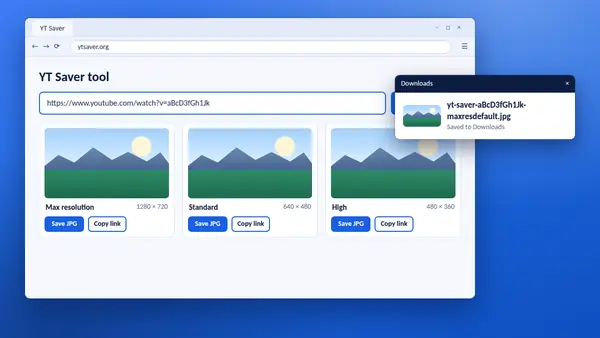
Each size has its own Save button. Files are named with the video ID and size, so they stay easy to sort.
Timestamp links
Type a start time such as 1:30 and get a short link that opens the video at that moment.
Clean embed code
Copy ready-made embed code, with privacy-enhanced mode and an optional start time.
Video ID finder
YT Saver pulls the 11-character video ID out of any kind of YouTube link and lets you copy it.
Runs in your browser
Nothing to install and no account. The link you paste stays on your device.
Works on any device
The page adapts to phones, tablets and computers, and the tool behaves the same on each.
YT Saver checks each size as it loads. When a video has no 1280 by 720 image, that card is marked as not available, so you never save a blank placeholder by mistake.
How to use YT Saver
From a copied link to a saved image in six short steps.
Copy the video link
On a computer, copy the address from the browser bar. In the YouTube app, tap Share, then Copy link.
Paste it into YT Saver
Put the link in the box at the top of the tool. A plain video ID works too.
Select Get thumbnail
The tool finds the video ID and shows the thumbnail in five sizes.
Choose a format
Pick JPG or WebP from the Format menu above the thumbnails.
Save the size you want
Select Save under a size. Max resolution gives the best quality when it is available.
Use the link tools
Add a start time to build a timestamp link, or copy the embed code for your website.
The whole job takes a few seconds. If your browser opens the image in a new tab instead of saving it, right-click the image and choose Save image as. On a phone, press and hold the image.
Thumbnail sizes in YT Saver
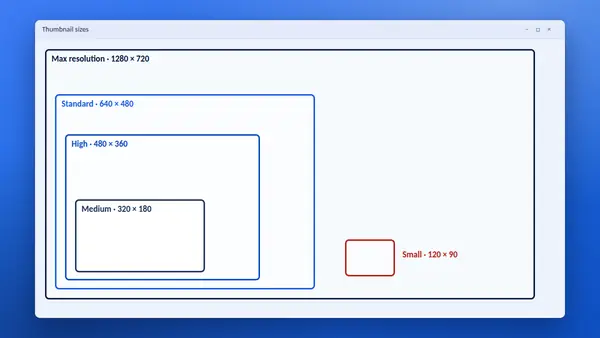
YouTube keeps each thumbnail in several sizes. Here is what you get and when to use it.
- Max resolution
- 1280 × 720 pixels, widescreen. The full-size image. Best for articles, slides and design work. Not available for every video.
- Standard
- 640 × 480 pixels. A solid fallback when the largest size is missing. Widescreen thumbnails show black bars.
- High
- 480 × 360 pixels. Exists for every video, so it never fails. Also has black bars on widescreen images.
- Medium
- 320 × 180 pixels, widescreen. Small and light with no bars. Ideal for lists and cards on a web page.
- Small
- 120 × 90 pixels. The tiny default preview. Useful for spreadsheets and catalogues.
- WebP versions
- The same five sizes in a newer format. Smaller files at similar quality, for websites and large collections.
The Standard, High and Small sizes use an older 4:3 shape, so a widescreen thumbnail appears with black bars above and below. For a clean widescreen image, choose Max resolution or Medium.
Start YT Saver
There is nothing to download or install. Copy a YouTube link, open the tool and paste it in.
Free to use on any device with a modern browser. No account, no sign-up and no limit on the number of thumbnails.
- Runs in
- Your web browser
- Price
- Free
- Setup
- Nothing to install
- Saves
- Thumbnails as JPG or WebP
- Builds
- Short, timestamp and embed links
- Account
- Not needed
Links that YT Saver accepts
Paste whichever form of link you have. YT Saver finds the video in all of them.
- Watch links
- youtube.com/watch?v=...
- Short links
- youtu.be/...
- Shorts
- youtube.com/shorts/...
- Embed links
- youtube.com/embed/...
- Live links
- youtube.com/live/...
- Mobile and Music
- m.youtube.com, music.youtube.com
- Links with a time
- The start time is read automatically
- Video ID
- Any 11-character ID on its own
Extra parts of a link, such as a sharing code or a playlist reference, are ignored. If a link includes a start time, YT Saver reads it and fills in the Start time box for you. Private and deleted videos have no public thumbnail, so nothing will load for them.
YT Saver needs a current browser such as Chrome, Edge, Firefox or Safari, with JavaScript switched on. It works the same on Windows, macOS, Linux, Android and iOS.
JPG compared with WebP
YT Saver offers both formats. The picture is the same. The difference is file size and where the file opens.
| Feature | JPG | WebP |
|---|---|---|
| File size | Larger | Smaller |
| Works in current browsers | Yes | Yes |
| Opens in older software | Yes | Not always |
| Accepted by office programs | Yes | Varies |
| Best for | Sharing and editing | Web pages |
Pick JPG when the image is going into a document, a slide or an email, or when you do not know what the other person uses. Pick WebP when the image is going on a web page and loading speed matters. You can convert between the two later in most image editors.
Get more from YT Saver
Six habits that make the tool more useful.
- Start with Max resolutionIt is the sharpest image. Drop to Standard or High only when it is marked as not available.
- Use Medium for listsIt is widescreen with no black bars and loads quickly on a web page.
- Back up your own artworkSave the thumbnail of each video you publish. It is a simple archive of your designs.
- Embed instead of copyingTo show someone else's video on your site, use the embed code. The creator keeps control and the views.
- Share the exact momentAdd a start time before you send a long video. People are far more likely to watch.
- Ask before you reuseA thumbnail is someone's work. A short, polite request usually gets a quick yes.
YT Saver guides
Step-by-step help for thumbnails, links and embedding.
-
How to save a YouTube thumbnail with YT Saver
Paste a link, pick a size and save the image. The whole job takes a few seconds.
Read full guide -
YouTube thumbnail sizes explained
What each stored size is called, where it is used and which one to choose.
Read full guide -
YouTube thumbnail size and specs for creators
The right shape, resolution and format for a custom thumbnail, plus design tips.
Read full guide
Questions about YT Saver
Short answers to what people ask most often.
Is YT Saver free?
Yes. YT Saver is free to use, with no account, no sign-up and no limit on how many thumbnails you save.
Does YT Saver download YouTube videos?
No. YT Saver saves thumbnail images and builds links and embed code. It does not download video or audio. For watching without a connection, use the offline feature in the official YouTube app.
Is YT Saver safe to use?
Yes. The tool runs in your browser. There is nothing to install, and the link you paste is not sent to this site. The images load straight from YouTube's own image server.
Which links does YT Saver accept?
Normal watch links, short youtu.be links, Shorts, embed and live links, links from the mobile site and YouTube Music, and a plain 11-character video ID.
Why is the Max resolution thumbnail missing?
The 1280 by 720 size only exists when the original thumbnail or video was large enough. Older and low-resolution videos stop at a smaller size. YT Saver tells you when a size is not available so that you can pick the next one.
Should I save a JPG or a WebP in YT Saver?
Choose JPG if the image is going into a document or an older program, because it opens everywhere. Choose WebP for a web page, because the file is smaller.
Can I use a thumbnail I saved with YT Saver?
Thumbnails belong to the people who made them. Saving the artwork of your own videos is fine. For someone else's video, ask for permission before you reuse the image, or embed the video instead.
Does YT Saver work on a phone?
Yes. Copy the link from the Share menu in the YouTube app, open YT Saver in your browser and paste it. If the image opens in a new tab, press and hold it to save.
Does YT Saver keep the links I paste?
No. The tool works inside your browser and has no account or history. Nothing you paste is stored by this site.
How do I make a link that starts at a certain time?
Paste the video link, type the time in the Start time box, for example 1:30, and copy the link beside it. YT Saver converts the time to seconds and adds it to the link.