A custom thumbnail is the first thing a viewer sees. Getting the technical side right is the easy part, and it leaves you free to think about the picture.
The basic specification
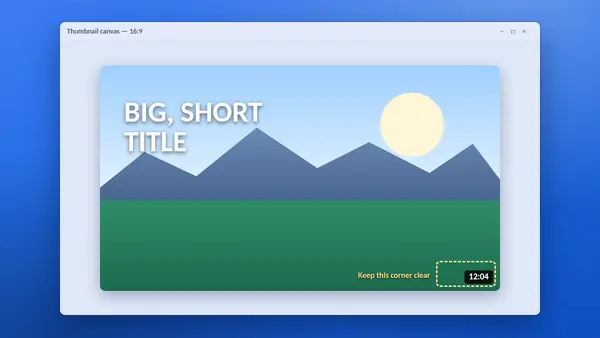
- Shape: 16:9, the same as the video player.
- Resolution: 1280 × 720 pixels has long been the recommended size, with a minimum width of 640 pixels.
- Format: JPG or PNG are the usual choices.
- File size: the classic limit is 2 MB.
YouTube has been raising these limits. Its current help pages mention larger images, up to 4K, and a much higher file size limit when uploading from a computer than from a phone. Check YouTube Help for today's figures before exporting a large file. An image of 1280 × 720 under 2 MB is accepted everywhere.
Who can upload one
Custom thumbnails need a verified YouTube account. Until a channel is verified, you can only pick one of the frames YouTube suggests.
Design for the smallest screen
Most thumbnails are seen at the size of a postage stamp on a phone. Before you publish, shrink your design to about 320 pixels wide and look at it.
- Use three or four words at most, in thick letters.
- Pick one clear subject. A face or a single object reads better than a busy scene.
- Use strong contrast between the subject and the background.
- Keep the bottom-right corner clear. YouTube places the video length there.
JPG or PNG?
Use JPG for photographs. It keeps the file small. Use PNG when the design is mostly flat colour and sharp text, and switch to JPG if the PNG is too large.
Follow the rules
Thumbnails must follow YouTube's Community Guidelines. A misleading or shocking image can be removed, and repeated problems can cost a channel its custom thumbnail feature.
Keep your originals
Save the project file and the exported image for every video. If you ever lose them, the YT Saver tool can fetch the published thumbnail of your own video at full size, which is better than starting again.
Study what works
Look at the thumbnails of your own best-performing videos side by side. Patterns appear quickly: a colour, a layout or a style of text that your viewers respond to.