Embedding places a YouTube player inside your own page. The video still plays from YouTube, so the creator keeps the views and you do not have to host a large file. It is the proper way to show a video on a website.
Get the embed code
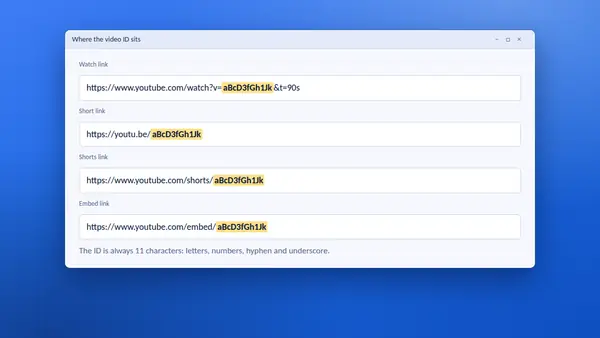
- Paste the video link into the YT Saver tool.
- Scroll to Links and embed code.
- Copy the code from the Embed code box.
- Paste it into the HTML of your page, or into an HTML block in your site builder.
Privacy-enhanced mode
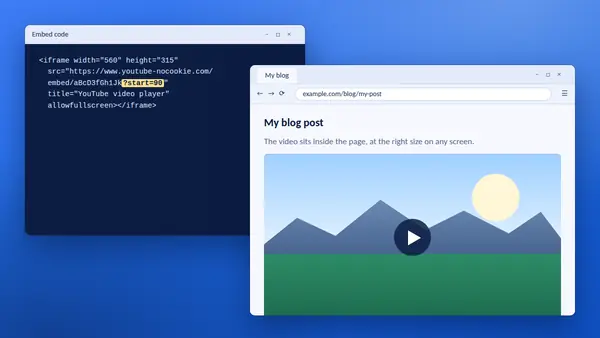
YT Saver ticks privacy-enhanced mode by default. The player then loads from youtube-nocookie.com, a YouTube address designed to limit tracking until the visitor presses play. It is a sensible choice for most websites. Untick the box if you want the standard address.
Start at a chosen time
Type a time in the Start time box and the embed code gains start= with the number of seconds. The player then opens at that moment.
Make the player fit every screen
The code sets a fixed size of 560 by 315 pixels. On a narrow phone that can be too wide. To make it flexible, add this rule to your site's CSS:
iframe[src*="youtube"] { width: 100%; height: auto; aspect-ratio: 16 / 9; }
The player then fills the width of its column and keeps the right shape.
Website builders
WordPress, Wix, Squarespace and similar tools usually accept a plain YouTube link and build the player for you. Use the short link from YT Saver. Reach for the embed code when you need privacy-enhanced mode or a start time and the builder does not offer them.
When a video will not embed
Creators can switch off embedding for a video. If the player shows a message instead of the video, link to it on YouTube instead.
Good manners
- Do not set videos to play automatically with sound.
- Add a line of text saying what the video is, for visitors who cannot play it.
- Keep one or two videos per page. Each player adds weight.
A lighter alternative
For a page with many videos, show each thumbnail as a link and let the visitor open the one they want. On your own channel's videos you can save the Medium size with YT Saver for exactly this purpose.