When a video is uploaded, YouTube stores its thumbnail in several sizes so that it can show a small image in a list and a large one on a television. YT Saver shows all of them. Here is what each one is.
The five sizes
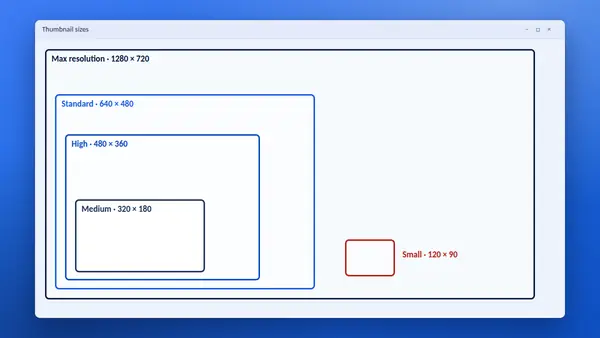
- Max resolution, 1280 × 720. The full-size image in widescreen 16:9. This is the one to use for anything people will look at closely.
- Standard, 640 × 480. A 4:3 image. Widescreen thumbnails have black bars at the top and bottom at this size.
- High, 480 × 360. Also 4:3 with black bars. It is created for every video, so it never fails.
- Medium, 320 × 180. A small widescreen image with no bars. Good for lists and cards.
- Small, 120 × 90. The tiny default image used in the smallest previews.
Why some sizes have black bars
The Standard, High and Small sizes use the older 4:3 shape. A modern 16:9 thumbnail does not fill that shape, so YouTube adds bars above and below. If you need a clean widescreen image, use Max resolution or Medium.
Why Max resolution is sometimes missing
The largest size only exists when the original thumbnail or video was big enough. Very old videos and low-resolution uploads often stop at Standard or High. YT Saver checks each size and tells you when one is not available.
JPG and WebP
Each size is stored in two formats. JPG opens in every program. WebP is a newer format that gives a smaller file at similar quality. YT Saver lets you switch between them with one menu.
Which size for which job
- Blog post or article image: Max resolution.
- Presentation slide: Max resolution, or Standard if the large one is missing.
- List of videos on a web page: Medium, because it is widescreen and light.
- Spreadsheet or catalogue: Small or Medium.
- Design reference: Max resolution, so that you can see the detail.
Are these the sizes creators upload?
No. A creator uploads one image. YouTube makes the smaller versions from it automatically. If you are preparing a thumbnail of your own, see our guide to thumbnail specifications for creators.
See them for any video
Paste a link into the YT Saver tool and all five sizes appear side by side, each with its dimensions.