Every video on YouTube has its own code, called the video ID. Plugins, spreadsheets, analytics tools and embed settings often ask for it. It is easy to find once you know where to look.
What it looks like
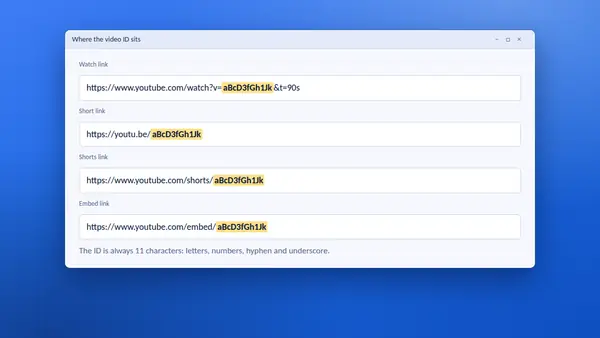
A video ID is 11 characters long. It uses letters, numbers, the hyphen and the underscore. Capital and small letters are different, so copy it exactly.
Where it sits in a link
- Watch link: after
v=, as inyoutube.com/watch?v=VIDEO_ID. Anything after an&is extra information, not part of the ID. - Short link: straight after the slash, as in
youtu.be/VIDEO_ID. - Shorts link: after
/shorts/. - Embed link: after
/embed/. - Live link: after
/live/.
The one-click way
- Paste any of those links into the YT Saver tool.
- Select Get thumbnail.
- The ID appears in the message under the box and in the Video ID field, with a Copy button.
This avoids the common mistake of copying one character too many or too few.
Common slips
- Including
&t=90sor?si=...from the end of a link. Those are a start time and a sharing code. - Changing the case of a letter.
- Confusing a video ID with a channel ID or a playlist ID. Playlist codes are longer and follow
list=.
What you can do with an ID
- Build a short link:
youtu.be/followed by the ID. - Build an embed address:
youtube.com/embed/followed by the ID. - Fill in the video field of a website plugin or theme.
- Keep a tidy list of videos in a spreadsheet, without long addresses.
Paste the ID on its own
YT Saver also works the other way round. Paste an 11-character ID by itself and it builds the short link, the embed code and the thumbnails from it.
Why the ID never changes
Renaming a video, changing its thumbnail or editing its description does not change the ID. It only disappears if the video is deleted, which is why the ID is the most reliable way to refer to a video.